Get started with Openn: set up email tracking in Gmail in two minutes
Openn works inside Gmail. Install the extension, reload Gmail and sign in from the banner it shows you, send an email, then open your Sent folder. If a step does not look like the picture, the fix is at the bottom of this page.
Last updated
Step 01
Install Openn from the Chrome Web Store
Openn is a Chrome extension: it needs Google Chrome on a computer.
It does not run in Safari, Firefox or the Gmail app on your phone. In Chrome, open the listing and add it:
 Add to Chrome
Chrome asks Add “Openn”? and lists what it can do, including “Display notifications”: that is for the optional Pro notifications, nothing is shown unless you turn them on. Click Add extension.
Then nothing visible happens. That is normal: Openn lives inside Gmail, not in a window of its own, and Chrome does not open anything after an install. Go to step 2.
Step 02
Reload Gmail and sign in from the Openn banner
Open mail.google.com in Chrome. If Gmail was already open, reload the tab (⌘ R on a Mac, Ctrl R on Windows, or the reload arrow next to the address bar): an extension only starts in pages loaded after it was installed.
Openn: sign in with Google to track your emails.Sign in
Click Sign in. Google asks you to choose an account: pick the one of this Gmail address. The banner then reads “Openn: your address is attached, your emails are tracked.” Your Openn account is created at that moment, there is no form to fill in and no password.
Later, if you also send from another Gmail address, the banner will ask you to attach that address too, once. If the banner never shows, see Still stuck? below.
Step 03
Send an email
Write and send an email exactly as before. The only change is in the compose window: the half circle next to Send is the Openn tracking switch. Green means this email is tracked; grey means it is not, and hovering it tells you why.
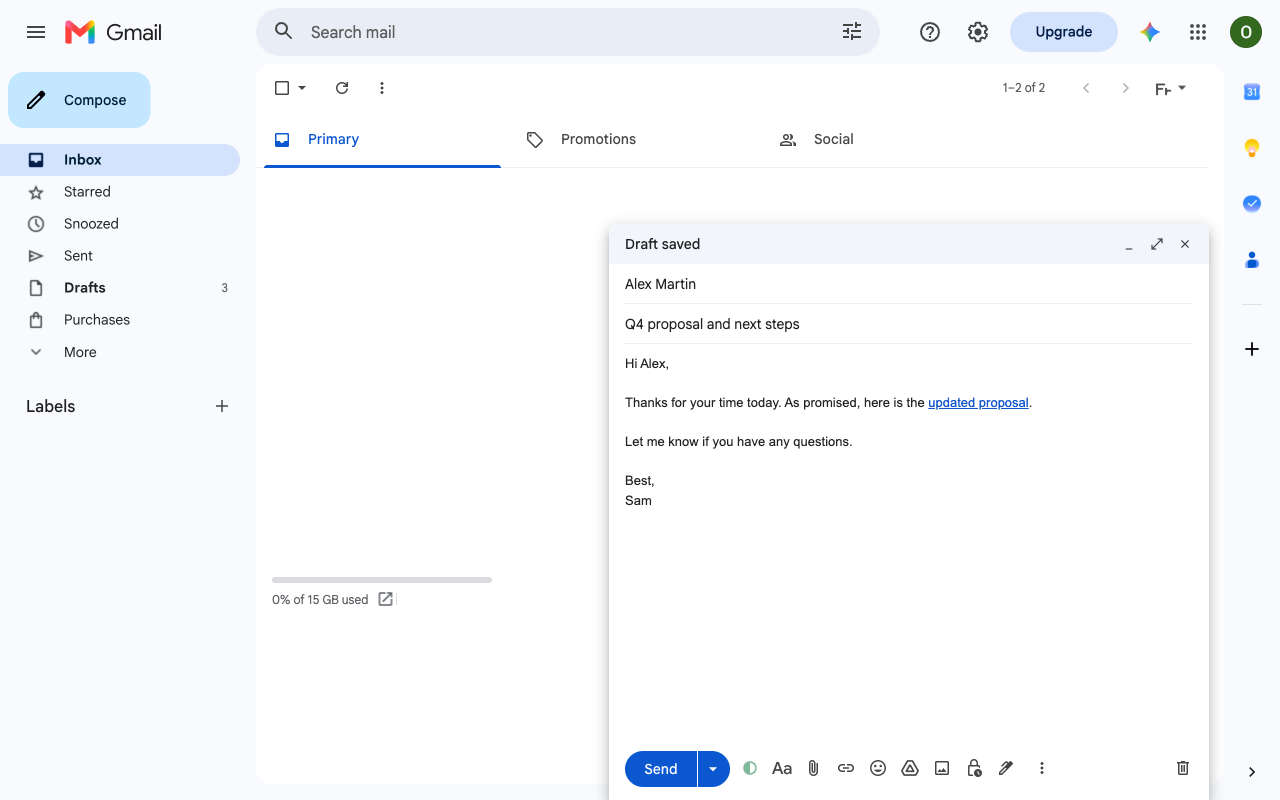
To see it work right away, send a test email to test@openn.io: Openn opens it about 20 seconds later and replies to tell you whether it was tracked.
Or send it to someone who will actually open it: a colleague, a client, a friend. Sending it to yourself proves nothing, because Openn never counts your own opens.
On the Free plan the email ends with a short “Sent with Openn” signature. Pro removes it.
Step 04
Read the result in your Sent folder
Click Sent in Gmail's left menu. Each tracked email now carries a small badge next to its subject: while nobody has opened it, once a recipient has. Hover the badge for the details, or open the email: a line above the message gives the full result.
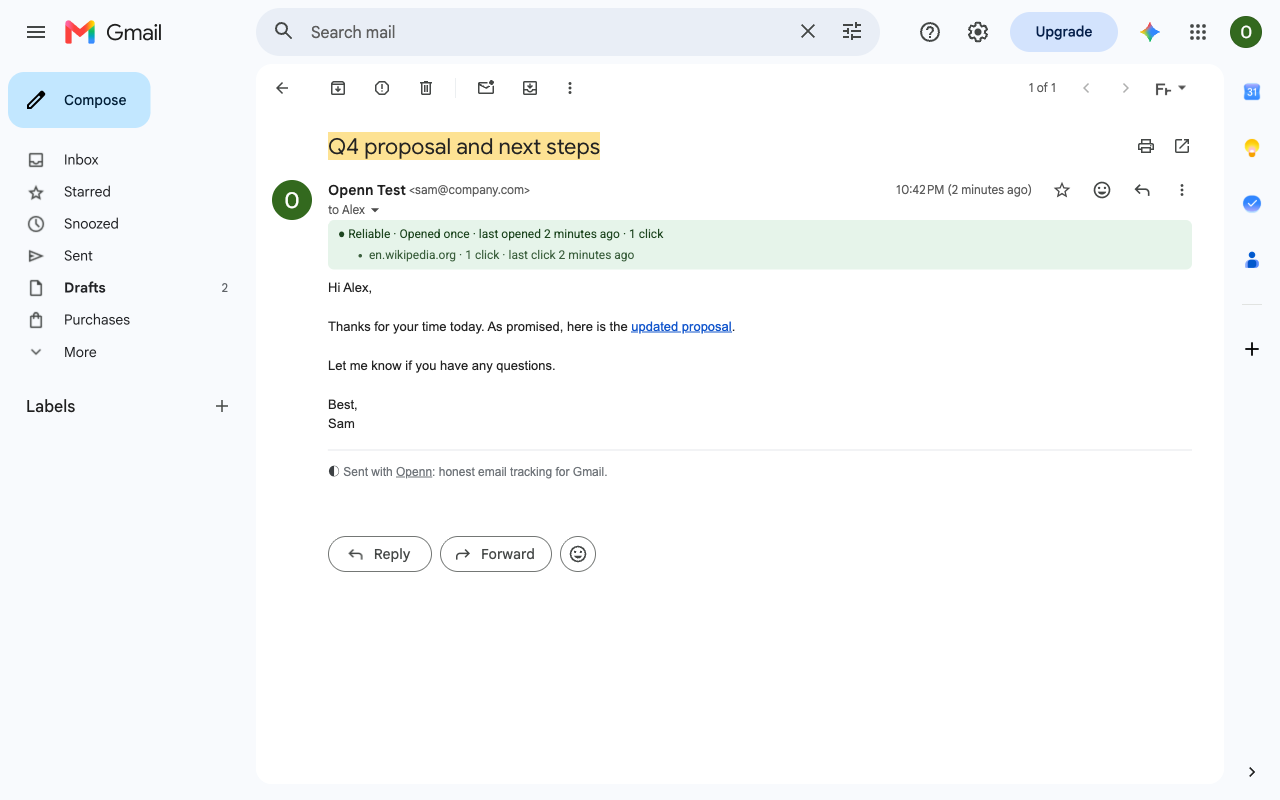
- “Not opened yet” is not an error. The recipient has not opened the email, or their mail app blocks images. A click still counts even then.
- The badge only appears on emails sent after you signed in, from this computer.
- Your own opens never count, even from your phone or another computer.
That is all. Openn now works for every email you send from this address, until you turn the switch off. What “Reliable”, “Estimate” and the other labels mean is on the how it works page.
Tip
Pin Openn to your toolbar (optional)
Click the puzzle piece at the right of Chrome's address bar, then the pin next to Openn. The icon is a shortcut to your account page: plan, addresses, settings.
Openn works exactly the same whether it is pinned or not.
Help
Still stuck?
No banner at the top of Gmail.
Reload the tab once more and look at the very top of the page, above the list of emails. Check that you are on mail.google.com in Google Chrome on a computer, and that Openn is switched on at chrome://extensions.
The banner says this address is not attached.
Click Attach this address. Each Gmail address you send from is attached once, up to 10 per account, and an address can belong to one Openn account only.
The switch in the compose window is grey.
Hover it: it tells you why. Signed out, or address not attached: sign in from the banner. Tracking turned off: click the switch to turn it back on.
I sent an email and there is no badge in Sent.
Badges only appear on emails sent after you signed in, from this computer. If Openn was updated or Chrome restarted in between, reload Gmail and send again.
I opened my own email and it still says Not opened yet.
By design. Openn recognises your own views and never counts them, so that the result only reflects your recipients.
Something else.
Write to support@idoventures.com and say at which step it stops. We answer every email.
Send the email.
Know what happened next.
Useful email signals, without the surveillance theatre.
Built for Gmail. Hosted in Europe.